WORKING WITH CLERO
Your team.
Your next step.
Get from a goal to work you can review. Learn how your space assistant, project managers, and agents work together.
Create your first projectStart with what you want to do
All guides →Create your first project
Create a manager-led project and open its first deliverable.
3 min readProjects and teamsControl when the project manager runs
Use objective events and review policy to control project handoffs.
5 min readWorkflow guidesSet up project manager checks
Use idle, one-time, and daily heartbeats to review project progress.
7 min readConnect the tools your task needs
Ask your agent for a connection card to connect an app from the conversation, including a custom MCP server. You review and authorize access; the agent’s tool permissions are a separate check.
UNDERSTAND THE TEAM
The right conversation
moves work forward.
Start across projects with your space assistant. Coordinate a project with its manager. Give focused work to the right agent.
How Clero works →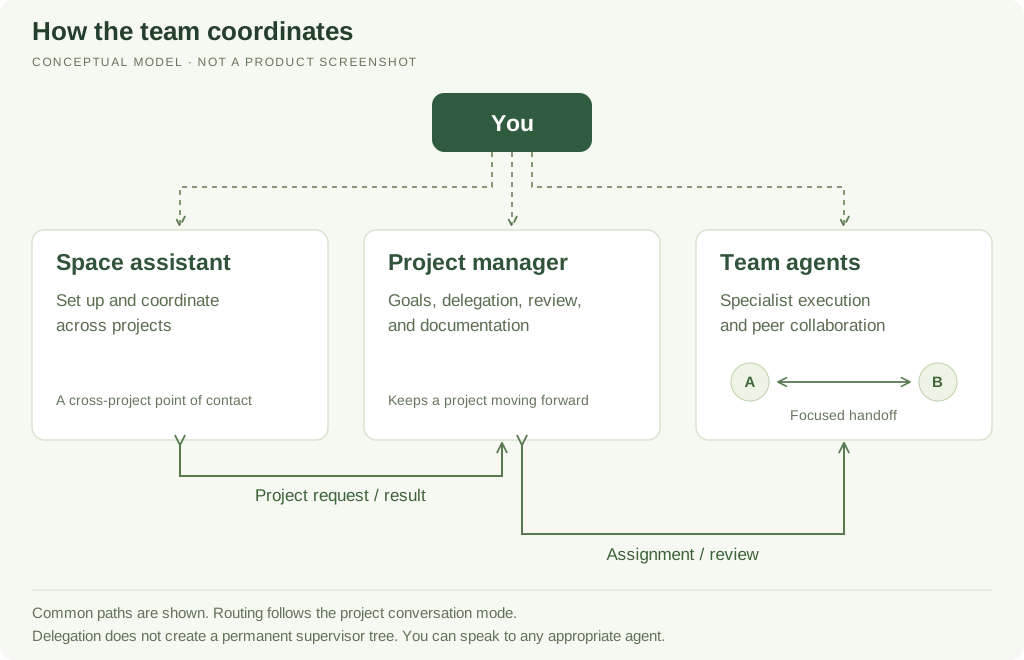
Explore the documentation
Start here
5 guidesUnderstand how Clero works, then complete a first project.
Projects and teams
11 guidesCoordinate work through the space assistant, project managers, and specialists.
Chat and control
3 guidesUse the right conversation and review settings for the task.
Knowledge and outputs
8 guidesChoose the right shared context, working records, and execution resources.
Tools and connections
9 guidesSeparate skills, tools, connections, and access before execution.
Workflow guides
8 guidesRun work now, once later, repeatedly, or when an event arrives.
Account and help
5 guidesManage account context, understand usage, and recover from common problems.
How to read this documentation preview
Each guide names what was tested, what was observed, and what is based on current source. Examples are starting points. A saved setup, a completed run, and delivery are separate checks. Source-backed instructions may differ from your deployed version.