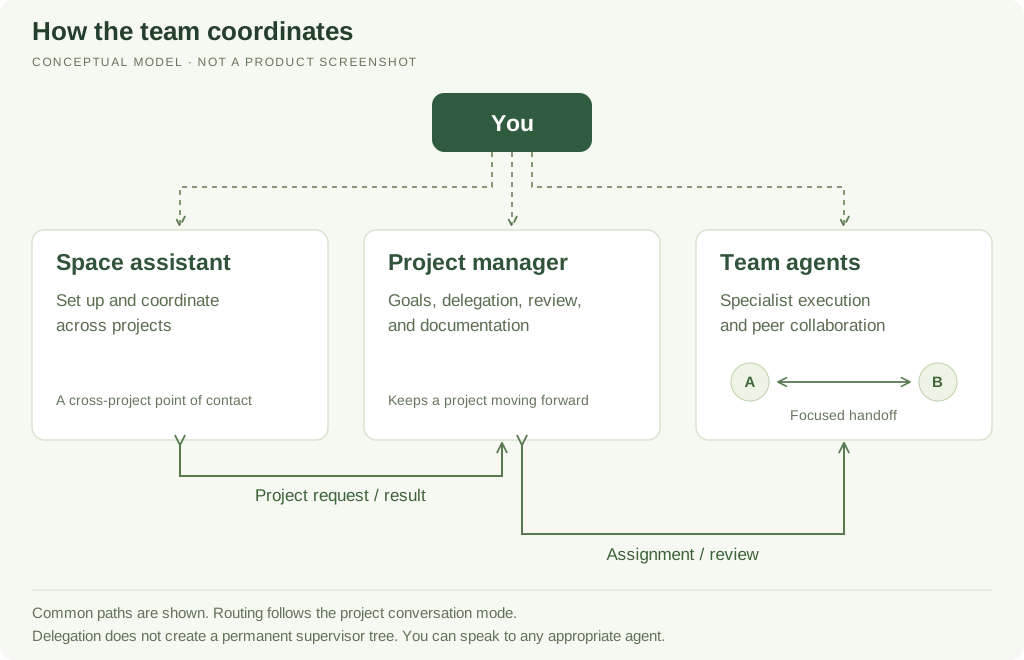
Clero organizes work around a space, projects, and reusable agents. The space assistant helps you coordinate across projects. A project manager owns coordination inside one project. Team agents carry out specialist work, with shared resources and explicit handoffs.
Start with the outcome, then choose where to ask
| You want to… | Start with… | Why |
|---|---|---|
| Set up a project or decide which experts it needs | Space assistant | It can create and staff projects |
| Get an update across accessible projects | Space assistant | It can inspect project summaries and request detail from managers |
| Coordinate a multi-step result in one project | Project manager | It tracks the objective, assigns work, and reviews contributions |
| Give a clear specialist task or correction | That project team agent | You can work directly with the agent responsible for that part |
| Connect an app or custom MCP server for the task | Ask the agent for a connection card | You review and authorize access through the card’s setup flow |
| Prompt the manager when objectives are created or change status | Project Flow | Selected events can queue a project-manager check |
| Check project progress after inactivity or once/daily | Heartbeats | User-managed checks revisit the project with its manager |
| Run something once at a future time | Ask the responsible agent for a scheduled task | A due date alone does not create an exact-time task |
| Repeat work on a timetable | Ask for a recurring schedule | The saved schedule defines future executions |
| Chat with the project from a messaging service | Project channel | Messages route to its assigned project agent |
| Process matching messages according to a repeatable procedure | Trigger | The trigger defines what work matching input starts |
The rows describe different jobs, not an obligation to send every message through a manager. Use the shortest path that preserves the context and coordination the work needs.
Understand the three agent roles
The space assistant is the entry point for the space. It is outside project teams, so it can help you organize work without becoming the owner of every project task. For detailed project coordination it asks that project’s manager; it can also delegate a bounded task to an eligible current project teammate.
The project manager keeps one project's work coherent. It handles objectives, blockers, status, review, documentation, and advice, and delegates execution to suitable team agents.
Team agents bring the specialist instructions, skills, and tools needed for execution. They can work directly with you and delegate to eligible teammates. There is no permanent supervisor tree created just because one agent delegates to another.
Choose how conversations continue
Persistent team gives each agent an ongoing project conversation. Delegated requests queue there and the result can be routed back to the requester.
Flexible chats keeps separate conversations and focused delegated tasks. This is useful for parallel lines of work, but the brief and shared references must be explicit.
These modes affect routing and available history controls. Delegation and messages explains the handoff lifecycle; Chats and branches explains conversation controls. Neither mode implies that every agent automatically receives every message.
Give the team usable resources
Use documents for briefs and deliverables, sheets for structured working records, and knowledge for source retrieval. A codebase connects a repository or working copy for software work; it is different from a reference document.
Shared state and memory explains which information belongs where. Capabilities separates a method the agent knows from the tools and connections it can actually use.
Review the outcome, not just the conversation
A request can be queued, running, waiting for input, awaiting review, or completed. A reassuring message is not a substitute for the saved result. Open the artifact, check the objective state, and inspect the run or schedule when timing matters.
The first-project walkthrough follows a completed fictional example: Mira created the project, Documentation Lead became its manager, and the manager produced a welcome document. The later coordination test also confirmed that Mira could request a read-only update from that manager and receive the result.
A simple way to begin
Help me set up a project for [outcome]. Recommend the smallest useful team. Explain what the manager will coordinate, what each specialist will do, which sources or connections are needed, and where I should review the first result.
For existing work, name the project and desired outcome instead of rebuilding the team. Decide whether the manager should react to objective events, check periodically, or wait for a direct request. Add a channel, concrete recurring task, or extra agent when the workflow needs one.