A codebase is a project resource that identifies the source code and working environment for software work. It can connect a local working copy, a GitHub mirror, or both. Agents use this context for authorized inspection, coding, and Git operations.
It is different from uploading a code snippet as knowledge. A reference document helps explain a system; a codebase connects work to the files and repository where changes are made.
Choose the right resource
| Resource | Use it for | It does not establish |
|---|---|---|
| Document or knowledge source | Specifications, architecture notes, examples, and reference material | A runnable checkout or permission to change a repository |
| GitHub mirror | Repository-backed code context and supported GitHub work | A local working copy or an online coding environment by itself |
| Local working copy | Code files on a connected execution environment | Permission for every agent or every computer to edit them |
| Codebase with both | Link a working copy to repository context | Automatic synchronization or permission to push without a review decision |
A repository connection and a running environment are separate things. If the requested execution path is offline or not configured, ask for the missing prerequisite rather than assuming the agent can run tests somewhere else.
Open Connect codebase
- Open the intended project.
- Select Data.
- Open New resource.
- Choose Codebase.
- Review the Connect codebase form.
The live form showed Local working copy, GitHub mirror, and Name. Both selectors were empty in the documentation account, and Connect was disabled. No repository or computer was connected in this test.
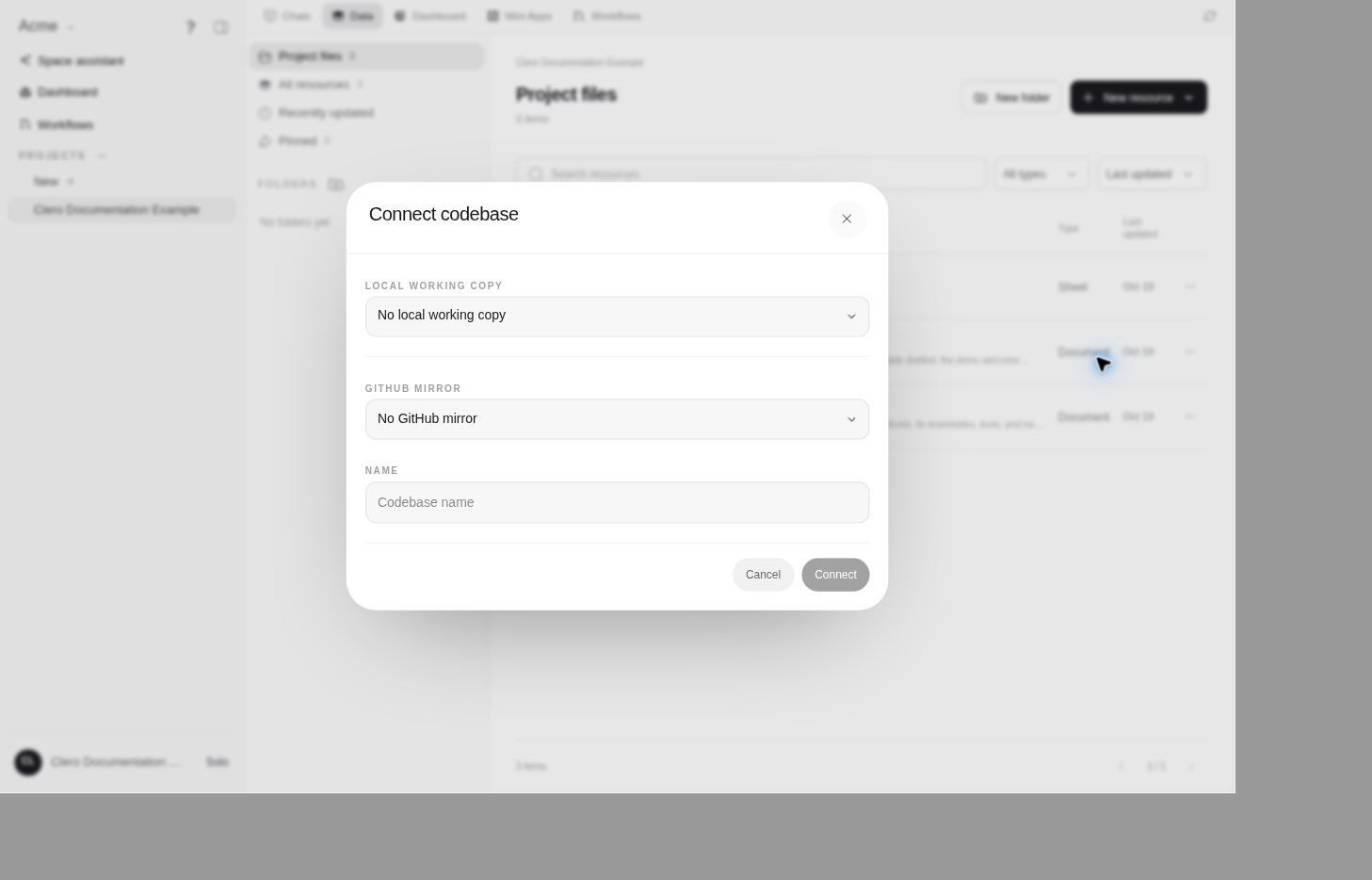
Current source supports choosing a valid working-copy folder, a GitHub mirror, or both, then saving the connection. A local working copy must be available through the appropriate connected environment. Do not enter someone else's folder or credentials to make a missing option appear.
Set up a bounded first task
Start with a read-only task to confirm the selected context:
Inspect this project's connected codebase. Report the repository or working-copy identity, current branch and working-tree state, and the test command documented by the project. Do not edit files, install dependencies, commit, or push.
Then give a scoped change to the suitable team agent:
In this codebase, implement [specific change]. Preserve unrelated local changes, run the relevant tests, and return a diff summary and test results for review. Do not push or deploy.
These are example briefs, not claims that the coding workflow was executed in the demo. Check the agent's actual tool result and environment before relying on its summary.
Assign the right editor
The current implementation has explicit codebase editors drawn from the current project team. The project manager is a required editor in this model, but its responsibility is still to coordinate and review specialist execution. Editor eligibility is not an instruction for the manager to do all coding itself.
A local working copy also has an owner. User-facing local actions check that ownership; being able to view the project does not make every member the owner of the connected computer or folder.
For broader agent configuration, see Roles and access and Capabilities.
Respect the configured editing route
Current source includes a Use for all edits coding-agent policy. When selected, code changes must go through the configured coding agent; direct filesystem writes are rejected. If that coding agent is offline, the correct response is a blocker, not an unannounced switch to a different editing path.
Check the saved editing policy after setup. The source-backed codebase-creation tool can create the resource but leave filesystem mode selected if the requested coding agent is unavailable; its result includes a warning. Resource creation alone does not prove the requested editing route was enabled.
A local coding provider can also have its own sandbox setting, including a broader-access option. Review that setting rather than assuming every provider invocation is confined to the same folder.
The source also exposes codebase status, branch and commit information, Git actions, and coding-task history. These are operational controls. Pulling, committing, pushing, running commands, and deploying have different effects and should match the task you authorized.
Review and hand off
Ask for the files changed, why they changed, tests run with their actual results, unresolved failures, and the branch or commit reference if one was deliberately created. Inspect the diff before authorizing publication or deployment.
Keep architecture decisions in a document and repeatable record data in a sheet. A codebase is the execution context; it does not replace project documentation, acceptance criteria, or human review.
When connection or execution is blocked
- No working copy or mirror available: Check the required connection and eligible source with its owner.
- Agent can discuss code but cannot edit it: Check editor membership, tools, and the selected execution route.
- Coding agent offline: Restore that environment or explicitly choose a permitted alternative; do not silently bypass its policy.
- Branch or local changes differ from expectations: Stop and clarify before commands that overwrite work.
- A Git action failed or its result is unclear: Inspect repository state before retrying.
The end-to-end connection, editing, test, and Git-write flows remain source-backed and untested in this documentation account.